الدليل الشامل لمحرري الفيديو بالذكاء الاصطناعي في عام 2026: الأدوات والميزات وكيفية اختيار الأفضل

اعتاد تحرير الفيديو أن يكون الجزء من صناعة المحتوى الذي لا يتحدث عنه أحد حقاً — الساعات التي تقضيها في تعديل الجداول الزمنية وتصدير نفس الملف أربع مرات مختلفة لأربع منصات مختلفة. بالنسبة لمعظم منشئي المحتوى، كان ذلك مجرد الضريبة التي تدفعها مقابل صنع الأشياء.
لقد تغير ذلك.
جعلت برامج تحرير الفيديو بالذكاء الاصطناعي جانب الإنتاج في صناعة المحتوى قابلاً للإدارة، حتى بالنسبة للأشخاص الذين يعملون بمفردهم دون فريق يدعمهم. ولكن أصبحت عبارة "مدعوم بالذكاء الاصطناعي" أيضاً واحدة من أكثر العبارات استخداماً في مجال البرمجيات، لذا يستحق الأمر البحث فيما وراء الضجيج: ما الذي تفعله هذه الأدوات جيداً حقاً، وأين لا تزال تقصر، وكيف تختار واحدة تناسب احتياجاتك؟
الأساسيات: محررو الفيديو بالذكاء الاصطناعي
في جوهره، يبحث محرر الفيديو بالذكاء الاصطناعي عن أنماط في الكلام، وفي الصمت، وفي كيفية هيكلة المحتوى، ثم يستخدم تلك الأنماط لأتمتة القرارات التي كانت ستتطلب اهتماماً يدوياً لولا ذلك.
الميزات الشائعة عبر معظم المنصات
- إزالة الصمت والكلمات الحشوية ← يكتشف فترات التوقف، والكلمات مثل "أمم"، والمساحات الصامتة ويقصها تلقائياً
- توليد التسميات التوضيحية ← ينسخ الكلام ويضبط توقيت الترجمة لتتطابق مع الصوت
- إعادة تنسيق المنصات ← يحول اللقطات الأفقية إلى عمودية أو مربعة دون قص يدوي
- صوت الذكاء الاصطناعي والتعليق الصوتي ← يولد صوتاً منطوقاً من النص
- توليد الفيديو بالذكاء الاصطناعي ← ينشئ مرئيات نائبة أو مفاهيمية من المطالبات النصية
هذه نماذج مدربة جيداً تؤدي وظائف محددة. يمكنها تقليل ساعات العمل بشكل كبير من سير عمل كان يستهلك يوماً كاملاً في السابق.
لمعرفة المزيد عن محرري الفيديو، راجع:
Fish Audio Video Editor
مقارنة الوقت
إليك مقارنة واقعية بين نهجين لإنتاج فيديو مدته خمس دقائق.
سير العمل التقليدي
أنت تقوم بـ:
- مشاهدة كل اللقطات في الوقت الفعلي
- قص الصمت يدوياً
- تنقية الصوت
- كتابة وتسجيل تعليق صوتي (إذا لزم الأمر)
- إضافة التسميات التوضيحية كلمة بكلمة
- إعادة التنسيق لكل منصة
- تصدير نسخ متعددة
بتقدير متحفظ، يستغرق ذلك من ساعتين إلى ثلاث ساعات، بافتراض عدم حدوث أي خطأ.
سير العمل المدعوم بالذكاء الاصطناعي
باستخدام أداة فيديو قوية مدعومة بالذكاء الاصطناعي، تبدو نفس العملية كالتالي:
- الرفع
- السماح للذكاء الاصطناعي بتوليد التسميات التوضيحية
- إضافة التعليق الصوتي إذا لزم الأمر
- التصدير
أنت تنظر في أقل من ساعة، وغالباً ما يكون ذلك أقل بكثير بمجرد اعتيادك على العملية.
اضرب ذلك في أربعة فيديوهات أسبوعياً، وستستعيد حوالي ثماني ساعات في الأسبوع. هذا ليس مكسباً صغيراً.
ميزات هامة
تتعامل معظم برامج تحرير الفيديو بالذكاء الاصطناعي مع الجانب المرئي بشكل جيد إلى حد معقول:
- القص التلقائي موثوق
- دقة التسميات التوضيحية تحسنت بشكل كبير
- إعادة التأطير الذكي تحافظ على الأهداف في المنتصف عبر نسب العرض إلى الارتفاع المختلفة
المكان الذي تتباعد فيه الأدوات حقاً، وحيث تكون فجوة الجودة كبيرة، هو الصوت.
فجوة جودة الصوت
أصبح تحويل النص إلى كلام (TTS) مضمناً في كل محرر فيديو عبر الإنترنت تقريباً الآن. ولكن "مضمن" و"جيد" هما شيئان مختلفان تماماً.
تنتج العديد من محركات TTS تعليقاً صوتياً يكون:
- صحيحاً تقنياً
- رتيب النغمة
- غير طبيعي قليلاً في الوتيرة
- يفتقر إلى نبرات الصوت المقنعة
بالنسبة للمحتوى الطويل (أكثر من 10 دقائق)، يتضاعف هذا التأثير.
لاستكشاف الفروق في أدوات TTS، راجع:
Traditional TTS vs AI Text-to-Speech
هذا الأمر مهم لأن الصوت يحمل ثقلاً لا تحمله المرئيات. المشاهدون أكثر تسامحاً مع المرئيات المتوسطة، لكنهم أقل تسامحاً بكثير مع التعليق الصوتي الآلي. في المنصات التي يكون فيها التشغيل التلقائي للصوت هو الوضع الافتراضي، فإن الأداء الصوتي الضعيف هو أسرع طريقة لخسارة المشاهد في أول 30 ثانية.
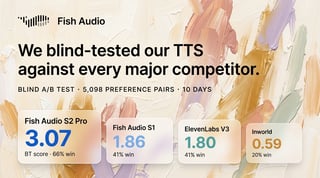
نهج Fish Audio تجاه الصوت
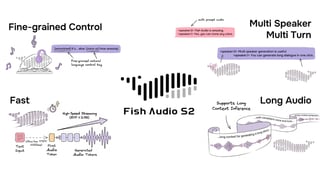
تتعامل Fish Audio مع هذه المشكلة بشكل مختلف. بدلاً من معاملة الصوت كميزة ثانوية مضافة إلى محرر مرئي، تم بناء محركهم خصيصاً حول الإيقاع الطبيعي، وتنوع النغمات، والنبرات الدقيقة.
تعرف على المزيد هنا:
Best Character Voice Generators in 2026
من الناحية العملية، يتضمن ذلك:
- الوصول إلى أكثر من 2 مليون صوت
- استنساخ الصوت من عينات صوتية قصيرة
- دعم لغات متعددة
- تحكم دقيق في النغمة العاطفية
بالنسبة لمنشئي المحتوى الذين يديرون قنوات بدون وجه، أو ينتجون محتوى تعليمياً، أو يبنون تنسيقات تعتمد بكثافة على التعليق الصوتي، فإن هذا المستوى من التحكم يؤثر بشكل مباشر على الاحتفاظ بالمشاهدين.
يندمج Fish Audio في سير العمل الحالي للإنتاج دون الحاجة إلى إصلاح شامل.
استكشف استنساخ الصوت هنا:
Voice Cloning by Fish Audio
مقارنة توليد الفيديو بالذكاء الاصطناعي
| الأداة | الأفضل لـ | القص والتسميات بالذكاء الاصطناعي | جودة صوت الذكاء الاصطناعي | توليد الفيديو بالذكاء الاصطناعي | نوع المحتوى المثالي |
|---|---|---|---|---|---|
| CapCut | التحرير السريع للمحتوى القصير | قوي | أساسي – متوسط | محدود | TikTok, Reels, Shorts |
| Descript | التحرير المستند إلى النص | قوي | متوسط | محدود | بودكاست، شروحات YouTube |
| Runway | توليد المرئيات بالذكاء الاصطناعي | متوسط | محدود | قوي | المرئيات المفاهيمية، المحتوى التجريبي |
| Pictory | تحويل النص إلى فيديو | متوسط | متوسط | متوسط | من مدونة إلى فيديو، محتوى تسويقي |
| Fish Audio (مع المحرر) | تعليق صوتي عالي الجودة | يعتمد على المحرر المقترن | قوي – متطور | محدود | فيديوهات YouTube الطويلة، الدورات، المحتوى التعليمي |
توليد الفيديو بالذكاء الاصطناعي: أين يكمن مكانه
يحظى توليد الفيديو بالذكاء الاصطناعي — إنشاء مرئيات من مطالبة نصية — باهتمام كبير، وهو مفيد في السياق الصحيح.
ومع ذلك، فهو ليس بديلاً عن اللقطات الحقيقية أو التحرير البشري. لا تزال المرئيات المولدة تفتقر إلى الاستمرارية السردية والتماسك الذي يأتي من التوجيه البشري.
أفضل النتائج في عام 2026 تعامل توليد الذكاء الاصطناعي كأداة واحدة في مجموعة الأدوات — وليس مجموعة الأدوات بأكملها.
عند إقرانه بمحرك صوتي قوي وهيكل تحريري واضح، تبدو النتيجة كاملة.
المجاني مقابل المدفوع: متى يجب الترقية
يعد محرر الفيديو المجاني بالذكاء الاصطناعي مكاناً معقولاً للبدء.
إذا كنت:
- تتعلم سير العمل
- تنشر أحياناً
- تختبر الميزات التي تحتاجها حقاً
فإن الفئات المجانية مصممة لذلك.
توقع قيوداً مثل:
- علامات مائية عند التصدير
- معالجة أبطأ
- خيارات صوتية أقل
- حدود استخدام شهرية
بمجرد أن تبدأ في النشر عدة مرات في الأسبوع، غالباً ما تكلف هذه القيود أكثر من قيمة الاشتراك.
يوفر Fish Audio فئة مجانية تتيح لك سماع محرك الصوت قبل الالتزام — وهو أمر مفيد بالنظر إلى مدى تحسن نماذج الصوت في السنوات الأخيرة.
اختيار الأداة المناسبة لمحتواك
يعتمد برنامج تحرير الفيديو المناسب بالذكاء الاصطناعي على ما تصنعه وعدد المرات.
منشئو المحتوى القصير (TikTok, Reels, Shorts)
- السرعة هي الأهم
- قص سريع
- تسميات توضيحية موثوقة
- تصدير سريع لمنصات متعددة
- جودة الصوت أقل أهمية
منشئو محتوى YouTube الطويل
- التعليق الصوتي الطبيعي ضروري
- نسخ دقيق للكلام
- أداء مستقر على الجداول الزمنية الطويلة
- الصوت هو ما يحمل فيديوهات تزيد مدتها عن 20 دقيقة
منشئو المحتوى التعليمي والدورات
- الاتساق عبر عشرات الحلقات
- تعليق صوتي واضح
- دعم لغات متعددة
- وضوح الصوت يؤثر بشكل مباشر على الاستيعاب
المحرر الذي يعمل بشكل أفضل لمنشئ محتوى TikTok منفرد ليس بالضرورة الأداة المناسبة لفريق ينتج فيديوهات شرح مدتها 30 دقيقة. اعرف فئتك قبل الالتزام بخطة.
الخاتمة
"تحرير الذكاء الاصطناعي يقتل التحكم الإبداعي."
ليس حقاً. فهو يزيل المهام غير الإبداعية — قص الصمت، إعادة التنسيق، وتوليد التسميات التوضيحية. القرارات التي تشكل محتواك لا تزال ملكك.
"كل أصوات الذكاء الاصطناعي تبدو آلية."
كان هذا صحيحاً في الماضي. لكنه لم يعد كذلك بشكل متزايد. المحركات التي تستثمر بجدية في إيقاع الكلام والموسيقية تنتج تعليقاً صوتياً لن يدرك معظم المستمعين فوراً أنه اصطناعي.
"توليد الفيديو بالذكاء الاصطناعي يحل محل تصوير اللقطات."
لا يحل محلها. بل يملأ الفجوات. لا يزال سرد القصص الحقيقي يعتمد على التوجيه البشري واللقطات الواقعية.
أصبحت المعالجة في الوقت الفعلي أكثر عملية. وتتعامل نماذج الصوت مع اللغات واللكنات والنغمات وأساليب التحدث بشكل طبيعي أكثر. ستعمل الموجة التالية من أدوات الفيديو المدعومة بالذكاء الاصطناعي على دمج الطبقات الصوتية والمرئية بشكل أعمق، وهي أنظمة تفهم كيف يرتبط ما يقال بما يتم عرضه.

Kyle is a Founding Engineer at Fish Audio and UC Berkeley Computer Scientist and Physicist. He builds scalable voice systems and grew Fish into the #1 global AI text-to-speech platform. Outside of startups, he has climbed 1345 trees so far around the Bay Area. Find his irresistibly clouty thoughts on X at @kile_sway.
اقرأ المزيد من Kyle Cui