Der ultimative Guide für KI-Video-Editoren 2026: Tools, Funktionen und die Wahl des richtigen Editors

Videobearbeitung war früher der Teil der Content-Erstellung, über den niemand wirklich sprach – die Stunden, die man mit dem Bearbeiten von Timelines und dem viermaligen Exportieren derselben Datei für vier verschiedene Plattformen verbrachte. Für die meisten Creator war es einfach der Preis, den man für das Erstellen von Inhalten zahlen musste.
Das hat sich geändert.
KI-Videobearbeitungssoftware hat die Produktionsseite der Content-Erstellung handhabbar gemacht, selbst für Einzelkämpfer ohne Team im Rücken. Aber „KI-gestützt“ ist auch zu einer der am meisten überstrapazierten Phrasen im Softwarebereich geworden. Es lohnt sich also, den Hype beiseite zu schieben: Was können diese Tools wirklich gut, wo stoßen sie noch an ihre Grenzen und wie wählt man eines aus, das den eigenen Bedürfnissen entspricht?
Die Grundlagen: KI-Video-Editoren
Im Kern sucht ein KI-Video-Editor nach Mustern in der Sprache, in der Stille und im Aufbau des Inhalts. Dann nutzt er diese Muster, um Entscheidungen zu automatisieren, die sonst manuelle Aufmerksamkeit erfordern würden.
Gemeinsame Funktionen der meisten Plattformen
- Entfernen von Stille und Füllwörtern → Erkennt Pausen, „Ähs“ und Leerlauf und schneidet sie automatisch heraus
- Untertitel-Generierung → Transkribiert Sprache und passt das Timing der Untertitel an
- Plattform-Neuformatierung → Konvertiert Querformat-Aufnahmen in vertikale oder quadratische Formate ohne manuelles Zuschneiden
- KI-Stimme und Narration → Erzeugt gesprochenes Audio aus einem Skript
- KI-Video-Generierung → Erstellt Platzhalter oder Konzept-Visuals aus Text-Prompts
Dies sind gut trainierte Modelle, die spezifische Aufgaben übernehmen. Sie können Stunden in einem Workflow einsparen, der früher einen ganzen Tag in Anspruch nahm.
Um mehr über Video-Editoren zu erfahren, siehe:
Fish Audio Video Editor
Zeitvergleich
Hier ist ein realistischer Vergleich zwischen zwei Ansätzen für ein fünfminütiges Video.
Traditioneller Workflow
Du:
- Schießt das gesamte Material in Echtzeit erneut an
- Schneidest Stille manuell heraus
- Bereinigst das Audio
- Schreibst und nimmst ein Voiceover auf (falls nötig)
- Fügst Untertitel Wort für Wort hinzu
- Formatierst für jede Plattform neu
- Exportierst mehrere Versionen
Konservativ geschätzt sind das zwei bis drei Stunden, vorausgesetzt, es geht nichts schief.
KI-gestützter Workflow
Mit einem soliden KI-basierten Videotool sieht derselbe Prozess eher so aus:
- Hochladen
- KI Untertitel generieren lassen
- Narration einfügen, falls nötig
- Exportieren
Du landest bei unter einer Stunde, oft deutlich weniger, sobald du mit dem Prozess vertraut bist.
Rechnet man das auf vier Videos pro Woche hoch, gewinnt man etwa acht Stunden pro Woche zurück. Das ist kein kleiner Gewinn.
Wichtige Funktionen
Die meisten KI-Videobearbeitungsprogramme beherrschen die visuelle Seite recht gut:
- Automatisches Trimmen ist zuverlässig
- Die Genauigkeit von Untertiteln hat sich deutlich verbessert
- Smart Reframing hält Motive über verschiedene Seitenverhältnisse hinweg zentriert
Wo sich die Tools jedoch wirklich unterscheiden – und wo der Qualitätsunterschied erheblich ist – ist die Stimme.
Die Qualitätslücke bei Stimmen
Text-to-Speech (TTS) ist mittlerweile in fast jedem Online-Video-Editor enthalten. Aber „enthalten“ und „gut“ sind zwei sehr verschiedene Dinge.
Viele TTS-Engines erzeugen eine Narration, die:
- Technisch korrekt ist
- Tonal flach klingt
- Im Tempo leicht unnatürlich wirkt
- Keine überzeugende Betonung besitzt
Bei Long-Form-Inhalten (10+ Minuten) verstärkt sich dieser Effekt.
Um Unterschiede bei TTS-Tools zu erkunden, siehe:
Traditionelles TTS vs. KI-Text-to-Speech
Das ist wichtig, da Audio eine tragende Rolle spielt, die Visuals oft nicht haben. Zuschauer verzeihen mittelmäßige Bilder eher als eine roboterhafte Narration. Auf Plattformen, auf denen Autoplay standardmäßig mit Ton erfolgt, ist eine schwache Stimmwiedergabe einer der schnellsten Wege, jemanden in den ersten 30 Sekunden zu verlieren.
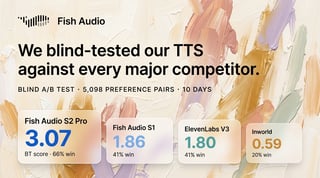
Fish Audio’s Ansatz für Stimmen
Fish Audio geht dieses Problem anders an. Anstatt die Stimme als sekundäres Feature zu behandeln, das an einen visuellen Editor angeflanscht wird, basiert ihre Engine speziell auf natürlichem Rhythmus, tonaler Vielfalt und subtiler Betonung.
Erfahre hier mehr:
Die besten Character Voice Generatoren 2026
In der Praxis beinhaltet das:
- Zugriff auf über 2 Millionen Stimmen
- Voice Cloning aus kurzen Audioproben
- Mehrsprachige Unterstützung
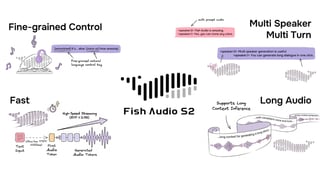
- Fein abgestimmte Kontrolle über den emotionalen Tonfall
Für Creator, die Faceless Channels betreiben, Bildungsinhalte erstellen oder narrationslastige Formate nutzen, wirkt sich dieses Maß an Kontrolle direkt auf die Zuschauerbindung aus.
Fish Audio lässt sich in bestehende Produktionsabläufe integrieren, ohne dass eine komplette Umstellung erforderlich ist.
Entdecke Voice Cloning hier:
Voice Cloning von Fish Audio
Vergleich der KI-Video-Generierung
| Tool | Bestens geeignet für | KI-Trimmen & Untertitel | KI-Stimmqualität | KI-Video-Generierung | Idealer Inhaltstyp |
|---|---|---|---|---|---|
| CapCut | Schnelle Short-Form-Bearbeitung | Stark | Einfach–Moderat | Begrenzt | TikTok, Reels, Shorts |
| Descript | Skriptbasierte Bearbeitung | Stark | Moderat | Begrenzt | Podcasts, YouTube-Erklärvideos |
| Runway | Visuelle KI-Generierung | Moderat | Begrenzt | Stark | Konzept-Visuals, experimentelle Inhalte |
| Pictory | Text-zu-Video-Konvertierung | Moderat | Moderat | Moderat | Blog-zu-Video, Marketing-Inhalte |
| Fish Audio (mit Editor) | Hochwertige Narration | Abhängig vom gekoppelten Editor | Stark–Fortgeschritten | Begrenzt | Long-Form YouTube, Kurse, Bildungsinhalte |
KI-Video-Generierung: Wo sie passt
KI-Video-Generierung — das Erstellen von Visuals aus einem Text-Prompt — zieht viel Aufmerksamkeit auf sich und ist im richtigen Kontext nützlich.
Es ist jedoch kein Ersatz für echtes Filmmaterial oder manuelles Editieren. Generierten Visuals fehlt es oft noch an narrativer Kontinuität und Kohärenz, die durch menschliche Regie entstehen.
Die besten Ergebnisse im Jahr 2026 erzielt man, wenn man KI-Generierung als ein Werkzeug im Werkzeugkasten betrachtet — nicht als den gesamten Werkzeugkasten.
Kombiniere es mit einer starken Voice-Engine und einer klaren redaktionellen Struktur, und das Ergebnis wirkt wie aus einem Guss.
Kostenlos vs. Kostenpflichtig: Wann man upgraden sollte
Ein kostenloser KI-Video-Editor ist ein guter Ausgangspunkt.
Wenn du:
- Den Workflow lernst
- Gelegentlich veröffentlichst
- Testest, welche Funktionen du wirklich brauchst
Kostenlose Tarife sind genau dafür gedacht.
Erwarte Einschränkungen wie:
- Wasserzeichen beim Export
- Langsamere Verarbeitung
- Weniger Stimmen-Optionen
- Monatliche Nutzungslimits
Sobald du mehrmals pro Woche veröffentlichst, kosten diese Einschränkungen oft mehr als ein Abonnement.
Fish Audio bietet eine kostenlose Stufe an, mit der du die Voice-Engine testen kannst, bevor du dich festlegst — nützlich, wenn man bedenkt, wie stark sich Sprachmodelle in den letzten Jahren verbessert haben.
Die Wahl des richtigen Tools für deinen Content
Die richtige KI-Videobearbeitungssoftware hängt davon ab, was du erstellst und wie oft.
Short-Form-Creator (TikTok, Reels, Shorts)
- Geschwindigkeit zählt am meisten
- Schnelles Trimmen
- Zuverlässige Untertitel
- Schnelle Exporte für mehrere Plattformen
- Stimmqualität weniger kritisch
Long-Form-YouTube-Creator
- Natürliche Narration ist essenziell
- Genaue Transkription
- Stabile Performance bei langen Timelines
- Die Stimme trägt 20+ minütige Videos
Bildungs- & Kurs-Ersteller
- Konsistenz über Dutzende von Episoden hinweg
- Klare Narration
- Mehrsprachige Unterstützung
- Klarheit des Audios beeinflusst direkt das Verständnis
Der Editor, der für einen Solo-TikTok-Creator am besten funktioniert, ist nicht unbedingt das richtige Tool für ein Team, das 30-minütige Erklärvideos produziert. Kenne deine Kategorie, bevor du dich für einen Plan entscheidest.
Fazit
„KI-Editing zerstört die kreative Kontrolle.“
Nicht wirklich. Es nimmt die nicht-kreativen Aufgaben ab – Stille schneiden, Neuformatieren und Untertitel generieren. Die Entscheidungen, die deinen Content prägen, liegen immer noch bei dir.
„Alle KI-Stimmen klingen roboterhaft.“
Das stimmte früher. Heute trifft das immer seltener zu. Engines, die ernsthaft in Sprachrhythmus und Musikalität investieren, erzeugen eine Narration, die die meisten Hörer nicht sofort als synthetisch erkennen.
„KI-Videogenerierung ersetzt das Filmen.“
Das tut sie nicht. Sie füllt Lücken. Echtes Storytelling hängt immer noch von menschlicher Führung und echtem Filmmaterial ab.
Echtzeit-Verarbeitung wird immer praktikabler. Sprachmodelle beherrschen Sprachen, Akzente, Töne und Sprechstile immer natürlicher. Die nächste Welle KI-gestützter Videotools wird Audio- und visuelle Ebenen tiefer integrieren — Systeme, die verstehen, wie das Gesagte mit dem Gezeigten zusammenhängt.

Kyle is a Founding Engineer at Fish Audio and UC Berkeley Computer Scientist and Physicist. He builds scalable voice systems and grew Fish into the #1 global AI text-to-speech platform. Outside of startups, he has climbed 1345 trees so far around the Bay Area. Find his irresistibly clouty thoughts on X at @kile_sway.
Mehr von Kyle Cui lesen