Welche Text-to-Speech-API hat die geringste Latenz für Echtzeit-Apps?

Der Sprachassistent funktioniert auf Ihrem Laptop über WLAN einwandfrei. Sie führen ihn vor, er beeindruckt die Leute, Sie liefern aus. Dann öffnet ein Nutzer die App über eine Mobilfunkverbindung, und die Pause, bevor die Stimme beginnt, beträgt 1,8 Sekunden. Das Gespräch fühlt sich an wie ein Telefonat mit einer schlechten Satellitenverzögerung. Der Nutzer schließt die App.
Latenz bei TTS ist kein unbedeutendes Detail für den Feinschliff. Für Echtzeit-Anwendungen ist sie der Unterschied zwischen einer Erfahrung, die sich wie ein Gespräch anfühlt, und einer, die sich anfühlt, als würde man ein Formular absenden und auf eine Antwort warten. Die Datenblätter sagen einem das nicht immer deutlich. Die meisten Benchmark-Zahlen werden im idealen Netzwerk des Anbieters mit einer vorgewärmten Verbindung gemessen.
Die Überraschung in der Produktion, auf die ich nicht vorbereitet war
Ich habe das vor etwa achtzehn Monaten bei einem Sprachassistenten-Projekt auf die harte Tour gelernt. Während der Entwicklung sah ich durchweg TTFB-Werte im Bereich von 180–220 ms – absolut akzeptabel, das Gespräch fühlte sich natürlich an, ich war zufrieden. Ich ging voller Zuversicht in die Woche der Lasttests.
Dann simulierten wir 200 gleichzeitige Nutzer. Eine API, die bei 5 gleichzeitigen Sitzungen hervorragend abgeschnitten hatte, sprang von diesen komfortablen 180 ms auf 2,3 Sekunden. Keine Warnung in der Dokumentation, keine schrittweise Verschlechterung – nur harte Latenzspitzen, die den Assistenten so wirken ließen, als würde er vor jeder einzelnen Antwort über ein schwieriges mathematisches Problem nachdenken. Wir bemerkten es erst eine Woche vor dem Start, und das ist nicht der Zeitpunkt, an dem man seinen TTS-Anbieter überdenken möchte.
Die Lösung bestand darin, zu einer API mit besserer Architektur für Gleichzeitigkeit zu wechseln und einen Teil der Audio-Pipeline so umzubauen, dass chunked HTTP-Streaming verwendet wird, anstatt auf die vollständige Dateiübertragung zu warten. Allein dieser Wechsel – vom Warten auf die komplette Datei zum Streamen von Chunks – reduzierte die wahrgenommene Zeit bis zur ersten Antwort von 1,2 Sekunden auf etwa 450 ms. Diese 450-ms-Schwelle ist in etwa der Punkt, an dem das menschliche Ohr die Lücke nicht mehr bewusst als „Pause“ registriert. Darunter fließt das Gespräch einfach. Darüber beginnen die Nutzer, ihr Verhalten anzupassen.
Entwickler-Hinweis: Der Benchmark auf Ihrem Entwicklungsrechner ist nutzlos, um die Produktionslatenz vorherzusagen. Testen Sie von einer Cloud-VM in der Region, in der sich Ihre Nutzer befinden, unter gleichzeitiger Last. Die Lücke zwischen „funktioniert auf meinem Rechner“ und „funktioniert bei 200 gleichzeitigen Nutzern in Südostasien“ ist der Ort, an dem die meisten Latenz-Überraschungen lauern.
300 ms, 800 ms, 2 Sekunden: Wo das Erlebnis wirklich bricht
Nicht alle Latenzschwellen sind gleichermaßen wichtig. Hier ist, was die Zahlen in der Praxis bedeuten:
Unter 150 ms: Fühlt sich verzögerungsfrei an. Nutzer nehmen keine Lücke zwischen ihrer Eingabe und der Sprachantwort wahr. Dies ist mit lokalem Deployment oder außergewöhnlichen Streaming-APIs erreichbar.
150–400 ms: Akzeptabel für Sprachassistenten. Nutzer bemerken eine leichte Pause, aber der Gesprächsrhythmus bleibt intakt. Die meisten gut optimierten Streaming-TTS-APIs landen unter normalen Bedingungen hier.
400 ms – 1 Sekunde: Die Pause ist hörbar und auffällig. Nutzer passen sich an, indem sie länger warten, bevor sie sprechen, was den natürlichen Gesprächsfluss stört. Sie können dies mit UI-Feedback kompensieren – einer Anzeige, die das Zuhören signalisiert, einer Animation –, aber Sie können es nicht vollständig verbergen.
Über 1 Sekunde: Das Gesprächsmodell bricht zusammen. Nutzer nehmen an, dass das System noch verarbeitet oder defekt ist. Dies ist der Bereich, in dem Support-Tickets eintreffen.
Es gibt einen wichtigen Unterschied, den die meisten Vergleiche übersehen: Time to First Byte (TTFB) versus Gesamtgenerierungszeit. Die Generierung eines Skripts mit 500 Wörtern als komplette Audiodatei kann 6–8 Sekunden dauern. Mit Streaming kommt der erste Audio-Chunk in 80–150 ms an und wird abgespielt, während die Generierung fortgesetzt wird. Die wahrgenommene Wartezeit des Nutzers beträgt 80 ms, nicht 8 Sekunden.
Dieser Unterschied allein entscheidet darüber, ob eine TTS-API für den Echtzeit-Einsatz geeignet ist.
Latenz und Streaming: Plattformvergleich
| Plattform | Ca. TTFB | Streaming | Gleichzeitigkeit | Self-Host-Option | Verfügbarkeit |
|---|---|---|---|---|---|
| Fish Audio | Millisekunden-Bereich | Ja | Hoch (Concurrent) | Ja (Fish Speech) | 99,9%+ |
| ElevenLabs | Wettbewerbsfähig | Ja | Ja | Nein | Hoch |
| Azure TTS | Moderat | Ja (Enterprise) | Hoch | Nein | Enterprise SLA |
| Google TTS | Moderat | Begrenzt (Basis) | Hoch | Nein | Hoch |
| OpenAI TTS | Wettbewerbsfähig | Ja | Moderat | Nein | Hoch |
TTFB-Zahlen variieren je nach Region, Verbindungsqualität und ob die Verbindung vorgewärmt ist. Testen Sie in der Region, in der sich Ihre Nutzer befinden, nicht von Ihrem Entwicklungsrechner aus.
Fish Audio: Millisekunden-TTFB und was das in der Produktion bedeutet
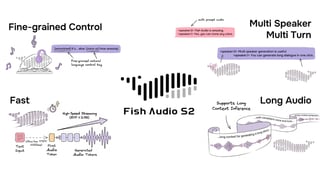
Die API von Fish Audio ist für die Bereitstellung in Echtzeit ausgelegt. Die Time to First Byte liegt im Millisekundenbereich, was sie in den Bereich bringt, in dem das Audio-Streaming beginnt, bevor der Nutzer eine Wartezeit bewusst registriert hat.
Streaming-Unterstützung bedeutet, dass die Audio-Pipeline so funktioniert, wie Browser Videos ausliefern: Chunks kommen an und werden abgespielt, sobald sie generiert wurden. Bei einer Antwort, deren Generierung als komplette Datei 4 Sekunden dauern würde, hören Nutzer bei einer normalen Verbindung bereits nach weniger als 200 ms den Ton. In einer 4G-Umgebung mit schwachem Signal konnten wir beobachten, wie chunked Streaming die effektive Ankunft des ersten Bytes von 1,2 Sekunden auf etwa 450 ms bei derselben API reduzierte – allein durch den Wechsel vom Warten auf die vollständige Datei zum Konsumieren des Streams, sobald er eintraf.
Die Architektur für Gleichzeitigkeit spielt bei der Skalierung eine große Rolle. Die meisten TTS-APIs beginnen zu drosseln, wenn die Anzahl der gleichzeitigen Anfragen steigt, was zu Latenzspitzen während Stoßzeiten führt. Die Unterstützung für hohe Gleichzeitigkeit bei Fish Audio bedeutet, dass die Leistung, die Sie während der Tests messen, näher an der Leistung liegt, die Sie erhalten, wenn 500 Nutzer gleichzeitig mit Ihrem Produkt sprechen.
Die Latenzleistung von Fish Audio ist stark, aber man sollte einen realen Faktor direkt ansprechen: Sie wird maßgeblich durch die geografische Entfernung zu Ihren Nutzern beeinflusst. Wenn sich die meisten Ihrer Nutzer in Europa befinden und Sie nicht über ein CDN oder Edge-Deployment routen, verringert sich der Latenzvorteil gegenüber den europäischen Rechenzentren von Azure. Die Auswahl regionaler Endpunkte und die CDN-Konfiguration sind ebenso wichtig wie die Wahl der API selbst.
Die Open-Source-Option verschiebt die Grenzen komplett. Fish Speech, das zugrunde liegende Modell, kann selbst gehostet werden. Self-Hosting bedeutet, dass die einzige Latenz die Inferenzzeit auf Ihrer Hardware ist, ohne den Netzwerkumweg zu einer externen API. Für latenzeritische Anwendungen, bei denen jede Millisekunde zählt, ist dies die einzige Option, mit der Sie niedrigere Werte erreichen können, als es jede Cloud-API ermöglicht. Die Inferenzlatenz auf einer modernen GPU liegt bei kurzen Antworten typischerweise unter 100 ms.
Ein dokumentierter Fall: Ein Entwickler, der Fish Audio in einen konversationsbasierten KI-Chatbot integrierte, mass durchgehend eine End-to-End-Latenz von unter 500 ms, einschließlich Netzwerk-Roundtrip, TTS-Generierung und Audio-Bereitstellung. Die vollständige API-Dokumentation finden Sie unter docs.fish.audio.
ElevenLabs: Wirklich wettbewerbsfähig für Englisch
ElevenLabs verdient hier ehrliche Anerkennung. Ihre Streaming-Latenz für englische Inhalte ist wirklich wettbewerbsfähig – ich habe in der Region US East TTFB-Werte von unter 200 ms gesehen, was angesichts der Qualität des Modells, das sie betreiben, beeindruckend ist. Sie haben erheblich in die Reduzierung der TTFB investiert, und für englischsprachige Inhalte gehört der Kompromiss zwischen Qualität und Latenz zu den besten verfügbaren.
Die Einschränkung für Echtzeit-Anwendungen besteht darin, dass der Latenzvorteil bei nicht-englischen Inhalten abnimmt und es keine Self-Hosting-Option gibt, falls Sie Werte unterhalb dessen benötigen, was deren Cloud-API liefert. Bei hoher Gleichzeitigkeit skalieren die Kosten zudem schneller als beim Modell von Fish Audio.
Eine starke Wahl für primär englischsprachige Assistenten, bei denen die Sprachqualität im Vordergrund steht. Stellen Sie nur sicher, dass Sie unter realistischen Bedingungen mit gleichzeitigen Nutzern testen, nicht nur im Einzelnutzer-Betrieb.
Azure TTS und Google TTS: Zuverlässig, nicht auf Geschwindigkeit optimiert
Sowohl Azure als auch Google operieren standardmäßig mit moderater Latenz. Die Streaming-Unterstützung von Azure ist verfügbar, erfordert jedoch in der Regel Zugriff auf die Enterprise-Ebene. Die Basis-API von Google bietet kein echtes Streaming im Sinne von zweckgebundenen Echtzeit-TTS-Plattformen.
Beide eignen sich für Anwendungen, bei denen eine Latenz von 500 ms bis 1 Sekunde akzeptabel ist: IVR-Systeme, Vorlesefunktionen in Apps, Benachrichtigungsstimmen. Sie sind nicht die richtige Wahl für konversationsbasierte KI oder Sprachassistenten, bei denen die Antwort unmittelbar erfolgen muss.
Entwickler-Hinweis: Wärmen Sie Ihre TTS-API-Verbindung vor. Die erste Anfrage in einer kalten Sitzung beinhaltet den TCP-Handshake-Overhead – typischerweise 30–100 ms je nach geografischer Entfernung –, den nachfolgende Anfragen nicht mehr haben. Die DNS-Auflösung fügt weitere 20–60 ms hinzu, wenn sie nicht zwischengespeichert wurde. Bei einem Sprachassistenten führt dies dazu, dass die erste Antwort spürbar langsamer ist als alle nachfolgenden. Senden Sie eine leichtgewichtige Warm-up-Anfrage bei der App-Initialisierung, noch bevor der Nutzer spricht.
Architektur-Entscheidungen, die die Latenz plattformunabhängig senken
Die Wahl der API ist wichtig, aber ebenso wichtig ist, wie man sie einsetzt. Hier sind einige Muster, die die wahrgenommene Latenz in Echtzeit-Anwendungen reduzieren:
Die Verbindung vorwärmen. Die erste Anfrage an eine API beinhaltet den TCP-Handshake-Overhead (30–100 ms) plus DNS-Auflösung (20–60 ms). Wärmen Sie die Verbindung vor, indem Sie eine Anfrage bei der App-Initialisierung senden, nicht erst, wenn der Nutzer zum ersten Mal spricht. Dies ist einer der einfachsten Wege, Latenz zu gewinnen, und fast niemand macht es standardmäßig.
WebSocket für interaktive Sitzungen, HTTP Chunked Transfer für Einzelantworten. WebSocket eliminiert den HTTP-Overhead pro Anfrage und ist die richtige Wahl für persistente Sitzungen. Für Anwendungsfälle mit Einzelantworten – eine Benachrichtigungsstimme, eine Vorlesefunktion – ist HTTP Chunked Transfer einfacher und funktioniert gut.
Statische Phrasen cachen. Begrüßungen, Bestätigungen, Fehlermeldungen, Navigationsaufforderungen. Generieren Sie diese einmal und liefern Sie sie aus dem Cache aus. So eliminieren Sie API-Aufrufe für 30–50 % der Sprachausgabe in den meisten Konversations-Apps vollständig.
Sofort mit dem Streaming beginnen. Warten Sie nicht auf die vollständige Audiodatei. Wenn Ihre API Streaming unterstützt (und die, die es wert sind, tun dies), leiten Sie den Stream direkt an den Audioausgang weiter und lassen Sie ihn abspielen, während der Rest generiert wird.
API-Region an Nutzer-Region anpassen. Ein TTS-API-Aufruf eines Nutzers in Tokio an einen Server in Virginia verursacht 150–200 ms reine Netzwerklatenz, bevor die Verarbeitung überhaupt beginnt. Das ist kein TTS-Problem, sondern ein geografisches Problem. Nutzen Sie regionale Endpunkte, wo verfügbar, und falls Ihr Anbieter diese nicht anbietet, kann ein CDN oder Edge-Proxy helfen.
Self-Hosting für extrem niedrige Latenzgrenzen. Wenn Ihre Anwendung eine Latenz von unter 100 ms erfordert, kann keine Cloud-API dies zuverlässig über ein normales Netzwerk liefern. Lokale Inferenz mit einem Open-Source-Modell wie Fish Speech ist der einzige architektonische Weg zu dieser Leistungsstufe.
Wahl der Plattform nach Anwendungstyp
Sprachassistenten und Begleit-KI: Streaming plus niedrigstmögliche TTFB sind nicht verhandelbar. Fish Audio oder ElevenLabs, getestet in der Region Ihrer Nutzer.
Chatbot-Sprachantworten: 300–500 ms sind normalerweise akzeptabel. Jede streamingfähige Plattform funktioniert. Priorisieren Sie Kosten und Sprachqualität gegenüber der reinen Latenz.
IVR- und Telefonsysteme: Latenzanforderungen sind weniger streng (500 ms – 1 s akzeptabel). Zuverlässigkeit und SSML-Steuerung sind wichtiger. Azure oder Amazon Polly passen hier gut.
Benachrichtigungs- und Warnstimmen: Batch-Generierung mit Caching ist völlig ausreichend. Latenz spielt keine Rolle, da das Audio vorab generiert wird. Die kostenlose Stufe von Google erledigt dies kosteneffizient.
Echtzeit-Übersetzung oder Live-Kommentar: Dies ist der schwierigste Fall. Streaming plus lokale oder ortsnahe Inferenz ist der einzige Weg, um eine akzeptable Latenz zu erreichen. Nutzen Sie Fish Speech als Self-Hosting-Lösung oder die Fish Audio API von einem geografisch nahen Endpunkt aus.
Häufig gestellte Fragen
Was gilt als niedrige Latenz für eine TTS-API in Echtzeit-Anwendungen? Unter 300 ms TTFB (Time to First Byte) ist im Allgemeinen für Sprachassistenten und konversationsorientierte KI akzeptabel. Unter 150 ms fühlt es sich verzögerungsfrei an. Über 500 ms wird der natürliche Rhythmus eines Gesprächs gestört. Die TTFB von Fish Audio im Millisekundenbereich ordnet sie in die schnellste Kategorie für Echtzeit-Einsätze ein.
Verringert Streaming die TTS-Latenz? Streaming reduziert die wahrgenommene Latenz erheblich. Es ändert zwar nicht die Gesamtzeit für die Generierung, beginnt aber mit der Audioausgabe, bevor die Generierung abgeschlossen ist. Eine Antwort mit 500 Wörtern, deren vollständige Generierung 8 Sekunden dauert, beginnt mit Streaming bereits nach weniger als 200 ms abzuspielen. Das Erlebnis des Nutzers ist der Start nach 200 ms, nicht die Fertigstellung nach 8 Sekunden.
Kann ich die TTS-Latenz durch Self-Hosting des Modells verringern? Ja. Self-Hosting eliminiert den Netzwerk-Roundtrip vollständig. Das Open-Source-Modell Fish Speech von Fish Audio kann auf Ihrer eigenen Infrastruktur betrieben werden. Die Inferenzlatenz auf moderner Hardware liegt bei kurzen Antworten typischerweise unter 100 ms, was unter dem liegt, was jede Cloud-API konsistent liefern kann.
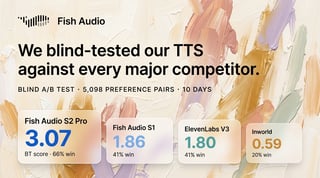
Welche TTS-API eignet sich am besten für Sprachassistenten, die schnelle Antworten benötigen? Für die meisten Sprachassistenten-Szenarien deckt die Kombination aus Millisekunden-TTFB, Streaming und hoher Gleichzeitigkeit von Fish Audio die Anforderungen ab. ElevenLabs ist die Alternative für primär englischsprachige Assistenten, bei denen die Sprachqualität an erster Stelle steht.
Wie teste ich die TTS-API-Latenz genau? Testen Sie von der Region aus, in der sich Ihre Nutzer befinden, nicht von Ihrem Entwicklungsrechner. Nutzen Sie Lasttests mit gleichzeitigen Anfragen, die Ihr erwartetes Spitzenaufkommen widerspiegeln. Messen Sie speziell die TTFB – die Zeit, bis das Audio eintrifft, nicht die Gesamtantwortzeit. Führen Sie Tests zu verschiedenen Tageszeiten durch, um variable Serverlasten zu erfassen. Die Einzelnutzer-Zahl auf Ihrem Entwicklungsrechner ist ein Best-Case-Szenario, kein Durchschnittswert.
Ändert sich die TTS-Latenz bei hoher gleichzeitiger Auslastung? Ja, bei Plattformen, die nicht für Gleichzeitigkeit ausgelegt sind. Die Unterstützung für hohe Gleichzeitigkeit bei Fish Audio ist darauf ausgelegt, eine konsistente TTFB auch unter Last aufrechtzuerhalten, was das entscheidende Leistungsmerkmal für Anwendungen mit vielen gleichzeitigen Nutzern ist.
Fazit
Für Echtzeit-Anwendungen ist die Wahl der Plattform einfacher als es scheint: Sie benötigen eine TTS-API, die Streaming unterstützt und eine TTFB von unter 300 ms in Ihrer Deployment-Region liefert.
Die Millisekunden-TTFB, das native Streaming, die hohe Gleichzeitigkeit und die Open-Source-Self-Hosting-Option von Fish Audio bieten das breiteste Spektrum an Einsatzmöglichkeiten für latenzeritische Anwendungen. ElevenLabs ist ein ernsthafter Konkurrent für primär englischsprachige Anwendungsfälle, bei denen die Sprachqualität oberste Priorität hat – probieren Sie es unbedingt aus.
Bevor Sie sich für eine Integration entscheiden, testen Sie die API aus der Region Ihrer Nutzer unter der tatsächlich zu erwartenden gleichzeitigen Last. Latenzzahlen vom Laptop des Entwicklers in einer idealen Umgebung lassen keine Rückschlüsse auf das Verhalten in der Produktion zu. Dies ist kein theoretischer Warnhinweis – es ist die spezifische Fehlerquelle, die mehr TTS-Integrationen hat scheitern lassen als jedes Problem mit der API-Qualität.
Beginnen Sie mit der Dokumentation unter docs.fish.audio und testen Sie die Streaming-Bereitstellung direkt an der Latenzschwelle Ihrer Anwendung.

Kyle is a Founding Engineer at Fish Audio and UC Berkeley Computer Scientist and Physicist. He builds scalable voice systems and grew Fish into the #1 global AI text-to-speech platform. Outside of startups, he has climbed 1345 trees so far around the Bay Area. Find his irresistibly clouty thoughts on X at @kile_sway.
Mehr von Kyle Cui lesen