Which Text to Speech API Has the Lowest Latency for Real-Time Apps?

The voice assistant works fine on your laptop over WiFi. You demo it, it impresses people, you ship. Then a user opens it on a mobile connection and the pause before the voice starts is 1.8 seconds. The conversation feels like a phone call with bad satellite delay. They close the app.
Latency in TTS isn't a minor polish issue. For real-time applications, it's the difference between an experience that feels like a conversation and one that feels like submitting a form and waiting for a response. The spec sheets won't tell you this clearly. Most benchmark numbers are measured on the vendor's ideal network with a pre-warmed connection.
The Production Surprise I Wasn't Ready For
I learned this the hard way on a voice assistant project about eighteen months ago. During development, I was consistently seeing TTFB in the 180-220ms range — totally acceptable, the conversation felt natural, I was happy. I went into the load test week feeling confident.
Then we simulated 200 concurrent users. One API that had performed beautifully at 5 concurrent sessions jumped from that comfortable 180ms to 2.3 seconds. No warning in the docs, no graceful degradation — just hard latency spikes that made the assistant feel like it was thinking through a difficult math problem before every single response. We didn't catch it until a week before launch, which is not when you want to be reconsidering your TTS provider.
The fix involved switching to an API with better concurrency architecture and rebuilding part of the audio pipeline to use chunked HTTP streaming instead of waiting for complete file delivery. That alone — switching from waiting for the full file to streaming chunks — compressed perceived first-response time from 1.2 seconds to about 450ms. That 450ms threshold is roughly where human ears stop consciously registering the gap as a "pause." Below it, the conversation just flows. Above it, users start adjusting their behavior.
Developer Note: Your dev machine benchmark is useless for predicting production latency. Test from a cloud VM in the region where your users are, under concurrent load. The gap between "works on my machine" and "works at 200 concurrent users in Southeast Asia" is where most latency surprises live.
300ms, 800ms, 2 Seconds: Where the Experience Actually Breaks
Not all latency thresholds matter equally. Here's what the numbers translate to in practice:
Under 150ms: Feels instantaneous. Users don't perceive a gap between their input and the voice response. This is achievable with local deployment or exceptional streaming APIs.
150-400ms: Acceptable for voice assistants. Users notice a slight pause but the conversational rhythm stays intact. Most well-optimized streaming TTS APIs land here under normal conditions.
400ms-1 second: The pause is audible and noticeable. Users adjust by waiting longer before speaking, which kills natural conversation flow. You can compensate with UI feedback — a listening indicator, an animation — but you can't fully hide it.
Over 1 second: The conversation model breaks. Users assume the system is processing or broken. This is the range where support tickets start arriving.
There's an important distinction most comparisons miss: time to first byte (TTFB) versus total generation time. A 500-word script might take 6-8 seconds to generate as a complete audio file. With streaming, the first audio chunk arrives in 80-150ms and plays while generation continues. The user's perceived wait is 80ms, not 8 seconds.
That distinction alone determines whether a TTS API is viable for real-time use.
Latency and Streaming: Platform Comparison
| Platform | Approx. TTFB | Streaming | Concurrency | Self-Host Option | Uptime |
|---|---|---|---|---|---|
| Fish Audio | Millisecond-level | Yes | High concurrent | Yes (Fish Speech) | 99.9%+ |
| ElevenLabs | Competitive | Yes | Yes | No | High |
| Azure TTS | Moderate | Yes (enterprise) | High | No | Enterprise SLA |
| Google TTS | Moderate | Limited (basic) | High | No | High |
| OpenAI TTS | Competitive | Yes | Moderate | No | High |
TTFB numbers vary by region, connection quality, and whether the connection is pre-warmed. Test in the region where your users are, not from your dev machine.
Fish Audio: Millisecond TTFB and What That Means in Production
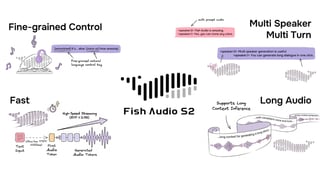
Fish Audio's API is built for real-time delivery. The time to first byte is millisecond-level, which puts it in the range where streaming audio starts before the user has consciously registered a wait.
Streaming support means the audio pipeline works the way browsers deliver video: chunks arrive and play as they're generated. For a response that would take 4 seconds to generate as a complete file, users hear audio starting in under 200ms on a normal connection. In a 4G weak-signal environment, we saw chunked streaming compress effective first-byte arrival from 1.2 seconds to around 450ms on the same API — just by switching from waiting for the full file to consuming the stream as it came in.
The concurrency architecture matters at scale. Most TTS APIs start throttling when simultaneous requests climb, which translates into latency spikes during peak traffic. Fish Audio's high-concurrency support means the performance you measure during testing is closer to the performance you get when 500 users are talking to your product simultaneously.
Fish Audio's latency performance is strong, but it's worth being direct about one real-world factor: it's meaningfully affected by geographic distance to your users. If most of your users are in Europe and you're not routing through CDN or edge deployment, the latency advantage narrows compared to Azure's European data centers. Regional endpoint selection and CDN configuration matter as much as API choice itself.
The open-source option changes the ceiling entirely. Fish Speech, the underlying model, can be self-hosted. Self-hosted means the only latency is the inference time on your hardware, with no network hop to an external API. For latency-critical applications where every millisecond matters, this is the one option that lets you go lower than any cloud API can take you. Inference latency on a modern GPU typically lands under 100ms for short responses.
One documented case: a developer integrating Fish Audio into a conversational AI chatbot measured end-to-end latency under 500ms consistently, including network round-trip, TTS generation, and audio delivery. The full API documentation is at docs.fish.audio.
ElevenLabs: Genuinely Competitive for English
ElevenLabs deserves honest credit here. Their streaming latency for English content is genuinely competitive — I've seen it come in under 200ms TTFB in US East regions, which is impressive given the quality of model they're running. They've invested significantly in reducing TTFB, and for English-language content, the quality-to-latency tradeoff is among the best available.
The limitation for real-time applications is that the latency advantage narrows for non-English content, and there's no self-hosting option if you need to go below what their cloud API delivers. At high concurrency, cost also scales faster than Fish Audio's model.
Strong choice for English-first voice assistants where voice quality is the primary concern. Just make sure you're testing at realistic concurrency, not single-user conditions.
Azure TTS and Google TTS: Reliable, Not Optimized for Speed
Both Azure and Google operate at moderate latency by default. Azure's streaming support is available but typically requires enterprise tier access. Google's basic API doesn't offer true streaming in the same sense as purpose-built real-time TTS platforms.
Both are appropriate for applications where latency is acceptable at 500ms-1 second. IVR systems, read-aloud features in apps, notification voices. Not the right choice for conversational AI or voice assistants where the response needs to feel immediate.
Developer Note: Pre-warm your TTS API connection. The first request in a cold session includes TCP handshake overhead — typically 30-100ms depending on geographic distance — that subsequent requests don't pay. DNS resolution adds another 20-60ms if you haven't cached it. In a voice assistant, this makes the first response noticeably slower than every response after it. Send a lightweight warm-up request at app initialization, before the user speaks.
Architecture Decisions That Cut Latency Regardless of Platform
The API choice matters, but so does how you use it. A few patterns that reduce perceived latency in real-time applications:
Pre-warm the connection. The first request to any API includes TCP handshake overhead (30-100ms) plus DNS resolution (20-60ms). Pre-warm by sending a request at app initialization, not when the user first speaks. This is one of the easiest latency wins and almost nobody does it by default.
Use WebSocket for interactive sessions, HTTP chunked transfer for one-shot responses. WebSocket eliminates the per-request HTTP overhead and is the right choice when you have a persistent session. For single-response use cases — a notification voice, a read-aloud feature — HTTP chunked transfer is simpler and works fine.
Cache static phrases. Greetings, confirmations, error messages, navigation prompts. Generate these once and serve from cache. You'll eliminate API calls entirely for 30-50% of voice output in most conversational apps.
Start streaming immediately. Don't wait for the complete audio file. If your API supports streaming (and the ones worth using do), pipe the stream directly to the audio output and let it play while the rest generates.
Match API region to user region. A TTS API call from a user in Tokyo to a server in Virginia adds 150-200ms of raw network latency before any processing starts. That's not a TTS problem — it's a geography problem. Use regional endpoints where available, and if your provider doesn't offer them, a CDN or edge proxy can help.
Self-host for hard latency ceilings. If your application requirement is genuinely under 100ms, no cloud API reliably delivers that over a normal network. Local inference with an open-source model like Fish Speech is the only architectural path to that performance tier.
Matching Platform to Application Type
Voice assistants and companion AI: Streaming plus lowest possible TTFB is non-negotiable. Fish Audio or ElevenLabs, tested in the region where your users are.
Chatbot voice responses: 300-500ms is typically acceptable. Any streaming-capable platform works. Prioritize cost and voice quality over raw latency.
IVR and phone systems: Latency requirements are more forgiving (500ms-1s acceptable). Reliability and SSML control matter more. Azure or Amazon Polly fit well here.
Notification and alert voices: Batch generation with caching is fine. Latency doesn't matter because the audio is pre-generated. Google's free tier handles this cost-effectively.
Real-time translation or live narration: This is the hardest case. Streaming plus local or near-local inference is the only way to achieve acceptable latency. Self-hosting Fish Speech or using the Fish Audio API from a geographically proximate endpoint.
Frequently Asked Questions
What is considered low latency for a TTS API in real-time applications? Under 300ms TTFB (time to first byte) is generally acceptable for voice assistants and conversational AI. Under 150ms feels instantaneous. Over 500ms breaks the natural turn-taking rhythm of a conversation. Fish Audio's millisecond-level TTFB places it in the fastest tier for real-time deployment.
Does streaming reduce TTS latency? Streaming reduces perceived latency significantly. It doesn't change the total generation time, but it starts delivering audio before generation completes. A 500-word response that takes 8 seconds to fully generate starts playing in under 200ms with streaming. The user's experience is the 200ms start, not the 8-second completion.
Can I reduce TTS latency by self-hosting the model? Yes. Self-hosting eliminates the network round-trip entirely. Fish Audio's open-source Fish Speech model can run on your own infrastructure. Inference latency on modern hardware is typically under 100ms for short responses, which is below what any cloud API can consistently deliver.
Which TTS API works best for voice assistants that need fast responses? For most voice assistant deployments, Fish Audio's combination of millisecond TTFB, streaming, and high concurrency covers the requirements. ElevenLabs is the alternative for English-first assistants where voice quality is the primary concern.
How do I test TTS API latency accurately? Test from the region where your users are, not from your development machine. Use concurrent request loads that reflect your expected peak traffic. Measure TTFB specifically — time until audio starts arriving, not total response time. Run tests at different times of day to capture variable server load. The single-user number on your dev machine is a ceiling, not a floor.
Does TTS latency change under high concurrent load? Yes, for platforms that don't architect for concurrency. Fish Audio's high-concurrency support is designed to maintain consistent TTFB under load, which is the relevant performance characteristic for applications with many simultaneous users.
Conclusion
For real-time applications, the platform choice is simpler than it appears: you need a TTS API that supports streaming and delivers a TTFB under 300ms from your deployment region.
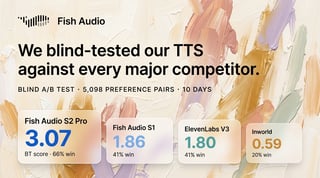
Fish Audio's millisecond-level TTFB, native streaming, high concurrency, and open-source self-hosting option give it the widest range of deployment patterns for latency-critical applications. ElevenLabs is a genuine competitor for English-first use cases where voice quality is the top priority — don't dismiss it without testing.
Before committing to any integration, test the API from the region where your users are, under the concurrent load you actually expect. Latency numbers from the developer's laptop in an ideal environment don't predict production behavior. That's not a theoretical caution — it's the specific failure mode that has burned more TTS integrations than any API quality issue.
Start with the documentation at docs.fish.audio and test streaming delivery directly against your application's latency threshold.

Kyle is a Founding Engineer at Fish Audio and UC Berkeley Computer Scientist and Physicist. He builds scalable voice systems and grew Fish into the #1 global AI text-to-speech platform. Outside of startups, he has climbed 1345 trees so far around the Bay Area. Find his irresistibly clouty thoughts on X at @kile_sway.
Leer más de Kyle Cui