Professional Voice Cloning: A Studio-Quality, Verified Clone of Your Voice


Fish Audio's Professional Voice Clone builds a studio-quality AI clone of a real, verified voice. Included with paid plans at no extra cost.
A ten-second clone gets you a voice that sounds roughly like you. For a quick test, that's plenty. But put it in front of an audience — an audiobook chapter, a brand video, a podcast intro — and "roughly" starts to show: flattened intonation, smudged consonants, an energy that isn't quite yours. That gap is exactly what professional voice cloning exists to close.
There's a second problem, and it belongs to the people behind the microphone. Voice actors have watched their recordings get cloned without permission, payment, or any say in where the result ends up. Handing your voice to an AI platform can feel less like an opportunity and more like a risk.
Professional Voice Clone (PVC), Fish Audio's newest cloning tier, takes on both problems at once. It trains a studio-quality clone on 10 to 180 minutes of your audio, and it will not finish until the voice's owner personally verifies — by live recording — that the voice is theirs. Creating one doesn't cost extra credits; PVC slots are included with Plus, Pro, and Max plans.
What Is Professional Voice Cloning?
Professional voice cloning is the process of training a high-fidelity AI replica of a real person's voice from an extended set of clean recordings, rather than from a short sample. Because the model learns from far more data — and far stricter data — a professional voice clone captures the pacing, intonation, and texture of the original speaker with much greater accuracy than instant cloning.
On Fish Audio, professional voice cloning adds a second defining trait: every PVC is verified. The clone only completes after the voice's owner passes a live ownership check, which makes a PVC not just a better copy, but a legitimate one.
PVC vs. Instant Voice Clone vs. Voice Design
There are now three roads to a voice on Fish Audio, built for different jobs:
| Instant Voice Clone | Professional Voice Clone | Voice Design | |
|---|---|---|---|
| Input | As little as 10s of audio, almost any format | 10–180 min of clean audio (MP3/WAV/FLAC only) | A text description |
| Quality bar on input | Lenient | Strict — clips with noise, long silences, or sound effects are rejected | n/a |
| Verification | — | Live ownership verification, required | n/a (original voices only) |
| Training time | ~1 minute | 1–2 hours | ~15 seconds |
| Best for | Quick tests, existing recordings | A flagship voice you'll publish and build on | Original characters that never existed |
Want a voice that doesn't exist yet? That's Voice Design. Need a copy fast? Instant cloning gets you a strikingly good one in about a minute. PVC is for the voice you'll put your name on.
Where the quality difference actually comes from
"Better and more natural" is what every cloning tool promises, so here's the mechanism instead. Compare the two upload screens:
1. Professional Voice Clone

2. Instant Voice Clone

Instant cloning accepts ten seconds of audio in nearly any format, video files included. PVC's analyzer wants a minimum of ten minutes — ideally 12–15 clips of 45–60 seconds each, in a consistent tone — and it inspects every file. Long silences, background noise, sound effects: any of these and the clip is sent back for re-recording.
That strictness is the product. A model trained for an hour of clean, consistent speech has simply heard more of you: more sentence shapes, more emotional range, more of the small habits that make a voice recognizable — and none of the garbage that teaches it the wrong things. The 1–2 hour training run does the rest.
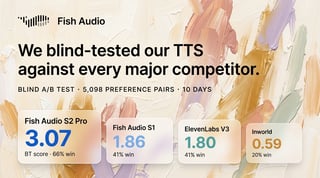
The engine doing the learning matters just as much. Fish Audio's voice models ranked #1 overall in our blind test against every major TTS provider — which is why even our instant clones are among the best you'll hear anywhere. A professional voice clone is that same engine, finally given everything it asks for.
How to Create a Professional Voice Clone on Fish Audio
Open the Create Voice page and pick Professional Voice Clone. Your plan's slot counter is shown right on the card.

Step 1: Upload your recordings
Gather your audio: MP3, WAV, or FLAC, with each clip under one minute. The sweet spot is 12–15 clips of 45–60 seconds in a consistent tone — same mic, same room, same energy. You need at least 10 minutes of total audio and can supply up to 180.
Record somewhere quiet and resist the urge to pad the total with whatever's lying around: the analyzer checks each file, and clips with background noise, long silences, or sound effects won't pass. Clean and consistent beats long and messy.
Step 2: Verify voice ownership

Before training begins, the person whose voice this is reads a short on-screen passage aloud, live. The system compares the voiceprint of that reading against your training files; if they match, you're through.
One thing to note: the reading must be done by the voice's owner themselves. If you're a studio or team working with a voice actor's permission, that means the actor personally completes this step — in your booth or remotely, whatever works for your setup. There is no way around the microphone, and that's deliberate: it's what makes every finished PVC a consented one.
Step 3: Analyze, then train
Hit Start analyze and the system inspects every file you've uploaded, one by one. Each clip comes back tagged — passed, or rejected with the specific reason ("background noise," "sound effect," and so on) — so you know exactly what to re-record or replace. Training only begins once your full set is clean.

From there, the model trains for 1–2 hours, and you can safely close the tab: an in-progress PVC is saved as a draft on the Create Voice page, and opening Professional Voice Clone again takes you straight back to it. When training completes, your verified voice is ready for text to speech.
Set up your first PVC → — included with your plan, no extra credits.
Voice Ownership Verification, Explained
Most cloning tools handle consent with a checkbox. You tick "I have the right to use this audio," and the platform takes your word for it.
Voice ownership verification replaces the checkbox with evidence. It is a live voiceprint match: the speaker reads a randomized passage, and the system compares that fresh reading against the uploaded training audio. A recording of someone else, or a clip pulled from the internet, won't match — the check is designed so that only the actual speaker, live, can pass it.
The protection runs in both directions. If you're a creator, verification means the voice you build on is one you demonstrably had the right to clone — a question that's getting sharper, with regulators like the FTC running initiatives against malicious voice cloning. If you're a voice owner, it means something stronger: on Fish Audio, a professional clone of your voice cannot exist unless you stand at a microphone and approve it.
Plans, Slots, and Managing Your Voice Clones
How many PVC slots does each plan include?
PVC capacity comes with your subscription — there's no per-clone fee and no credit cost to create one:
| Plan | PVC slots |
|---|---|
| Free | — |
| Plus | 1 |
| Pro | 5 |
| Max | 15 |
One thing worth knowing before you click: a slot is committed the moment you start. An unfinished PVC stays in your draft area — editable, resumable, holding its slot — until you complete it. So begin with the voice you actually mean to build.
Why finished clones can't be deleted yet
In this early stage of PVC, a completed clone can't be deleted. The reason is the road ahead: we're building toward commercial release and revenue-share features for voice owners, and those systems need stable, verified voice records to protect everyone involved — including you. As PVC matures, fuller management options will follow.
License and Monetize Your Voice: What We're Building
Spend five minutes in any voice acting community and you'll find the same advice repeated: don't sell your voice to AI. Given how this industry has treated voice owners so far, it's hard to call that advice wrong. Voices have been scraped, cloned, and reused with the actual human nowhere in the loop — and voice actors worldwide are organizing to push back.
We think the fix isn't to keep voices and AI apart — it's to rebuild the loop with the voice owner inside it. Verification is the foundation: a clone that provably required your participation is a clone that can carry real terms. On top of that foundation, we're building toward a future where you can license your voice on your own terms — releasing your PVC commercially if you choose, with revenue share flowing back to you when others use it, and clear records of what was authorized.
None of that works as a checkbox promise. It works as infrastructure, and PVC — verified, owner-approved, deliberately permanent — is the first piece of it. If you make your living with your voice, or you want to, this is the system we're building for you. And it starts with a step you can take today: create your verified PVC now, so when commercial release and revenue share arrive, your voice is already in the system — on record as yours.
A Voice Worth Building On
Quick clones are easy to make and easy to forget. A professional voice clone is a different kind of asset, and by now you know exactly why: it's trained on minutes-to-hours of audio instead of seconds, under a quality bar that rejects anything less than clean — it cannot exist without its owner's live say-so — and it's the foundation of the licensing and revenue-share system being built on top of it.
So here's where to start, whichever side of the microphone you're on. If you're a creator, gather ten minutes of your cleanest recordings and claim a slot; the analyzer will tell you the rest. If you're a voice professional, consider this an early invitation: a verified PVC today is your seat at the table when commercial release arrives.
Create your professional voice clone → — included with Plus, Pro, and Max plans.
Questions Fréquemment Posées
What is professional voice cloning?
What's the difference between instant voice clone and professional voice clone?
Do I need a paid plan to create a professional voice clone?
Can I clone someone else's voice with PVC?
Can I delete a professional voice clone?
How long does professional voice cloning take?

Sabrina is part of Fish Audio's support and marketing team, helping users get the most out of AI voice products while turning launches, updates, and customer insights into clear, practical content.
Lire plus de Sabrina Shu