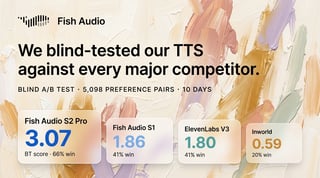
Best AI TTS for Creative Teams! Fish Audio Team Plan Explained

Fish Audio Pro includes a built-in team feature: up to 3 members share one credit pool, all voices, generation history, and Studio projects — at $75/month. Here's exactly how it works.
March 2026 | Fish Audio Team Plan is now available on Pro
Table of Contents
-
What Is the Fish Audio Team Feature?
-
Why Creative Teams Need a Shared AI Voice Workspace
-
What Gets Shared in a Fish Audio Team Workspace
-
How to Set Up Your Team — Step by Step
-
Who Should Use the Fish Audio Team Plan?
-
Best AI TTS for Creative Teams: How Fish Audio Compares
-
What's Coming: Story Studio V2 Collaboration and More Seats
-
FAQ
For creative teams looking for the best AI TTS solution, most tools create an immediate problem: everything is built for individual users. One account, one credit balance, one voice library. The moment a second person on your team needs access, you're either sharing login credentials — which violates most platform terms of service — or paying for a second subscription. For creative teams, neither option makes sense.
Fish Audio Pro includes a built-in team feature. One Pro subscription, up to three members, a shared credit pool, and shared access to every voice, generation, and project in the workspace. No credential sharing. No duplicate billing.
This guide covers how the Fish Audio Team Plan works, what's shared across the workspace, and why it's one of the most practical AI TTS options for creative teams that need shared voice workflows without paying for enterprise pricing.
If you want to skip ahead and try it now, the team feature is live on Fish Audio Pro.
What Is the Fish Audio Team Feature?
Fish Audio Team is a workspace feature included with every Pro subscription. When you upgrade to Pro, you automatically get a default team with 3 available seats — your own account plus 2 additional members you invite.
Every member of the team works from the same Pro plan. Credits are pooled. Voices are shared. Generation history is visible across the team. Studio projects are accessible to everyone in the workspace.
You can also create additional teams — each with its own Pro subscription, its own credit pool, and its own 3-seat allocation. Teams are billed and renewed independently.
Why Creative Teams Need a Shared AI Voice Workspace
When a team runs on separate individual accounts, four problems compound quickly.
-
Credit fragmentation. One member burns through their monthly allocation on a large project while another has credits sitting unused. There's no way to redistribute. You end up buying top-ups for one account while another goes to waste.
-
Asset duplication. Every voice clone, every custom model, every trained asset lives in the account that created it. If someone else on the team needs that voice, they either re-clone it — wasting time and credits — or you're back to sharing logins.
-
No shared history. Generation records, studio projects, iteration history — all siloed per account. Handing off a mid-production project means exporting files and rebuilding context from scratch.
-
Billing fragmentation. Multiple individual accounts mean multiple invoices, multiple renewal dates, and multiple expense reports. For teams that need to consolidate software costs — whether for accounting, reimbursement, or budget approval — managing five separate TTS subscriptions is an unnecessary overhead.
A shared AI voice workspace solves all four. One credit pool eliminates fragmentation. Shared assets mean zero duplication. A unified workspace means any team member can pick up where another left off. And one subscription means one invoice, one renewal date, and one line item on the budget.
What Gets Shared in a Fish Audio Team Workspace
When you add members to a Fish Audio team, they get access to everything in the Pro workspace — with a small set of exceptions.
Shared credit pool
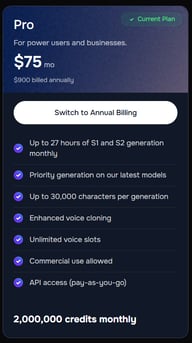
All 2,000,000 monthly credits go into one pool — no per-seat allocation, no manual transfers. Every generation made by any team member draws from the same balance, regardless of who initiated it. You can track exactly how credits are being used — and by whom — from the usage dashboard.
Shared voices and generation history
Every voice in the workspace — including privately cloned voices and custom-trained models — is visible and usable by all team members. Generation history is shared across the team, so you can review, reference, or continue any output regardless of who created it.
Personal actions — favorites, likes, and collections — remain per-user, so each team member can still curate their own reference library without cluttering the shared workspace.
Shared Studio projects
Studio projects are accessible to the full team. Any member can open, edit, or continue a project. This makes handoffs clean — no exporting, no file transfers, no rebuilding context. The project state is simply there, in the workspace, for whoever needs it next.
More shared features are coming — including Speech to Text projects, Sound Effects, and Audio Separation.
Shared API access (for developers)
The team's API key and credit pool are shared across all members. Developers on the team can build and test against the same credentials without managing separate API keys or topping up individual accounts. Everything runs from one billing source.
How to Set Up Your Team — Step by Step
Setting up a Fish Audio team takes under two minutes.
-
Open fish.audio and go to the app at fish.audio/app
-
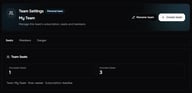
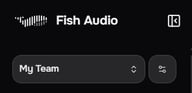
In the left sidebar, find My Team — it's the first item in the tool bar
-
Click the settings icon next to My Team to open the team management interface
-
In Team Settings, you'll see your current seat status:
-
Occupied Seats — how many seats are currently filled
-
Included Seats — 3 total on Pro (owner + 2 members)

-
-
Under Members, enter a User ID or email address and click Add Member

- The invited member now has full access to the shared workspace — credit pool, voices, generation history, and studio projects
Billing stays with the team owner. Members get full access to the workspace but have no visibility into subscription management or payment details — so you stay in control of the account without needing to share any billing information.
To create a second team with a separate workspace and credit pool, use Create Team in the same settings panel. Each team runs its own Pro subscription independently.
The Fish Audio Team feature is included in every Pro subscription. See the full plan breakdown to get started.
Who Should Use the Fish Audio Team Plan?
The Fish Audio team feature is built for small, production-focused teams where multiple people touch the same voice content.
-
Podcast and audio production teams. A producer and editor working on the same show can share a voice library and pull from the same credit pool without coordinating separate accounts.
-
Content and marketing teams. Teams producing voiceovers for ads, social content, or internal comms can keep all assets in one workspace — consistent voices, shared history, no duplication.
-
Indie game studios. Small studios handling character voice, narration, and dialogue can centralize everything in one Pro workspace and iterate faster without asset silos.
-
Agencies and freelancers with collaborators. If you work with a regular co-producer or contractor, bringing them into your team workspace gives them full access to your voice library without credential sharing.
-
Developers building voice-enabled products. A small dev team can share a single API-connected Pro workspace rather than managing separate accounts and credit top-ups per developer.
For small production teams evaluating the best AI TTS for creative teams, the core requirement is straightforward: shared assets, shared credits, and a workspace that doesn't require credential sharing or duplicate subscriptions.
Best AI TTS for Creative Teams: How Fish Audio Compares
For creative teams evaluating AI TTS options, the pricing gap between platforms is significant — especially once you factor in team features.
Pricing data sourced from each platform's official pricing page as of March 2026. Prices are subject to change.
Fish Audio vs ElevenLabs
ElevenLabs offers team workspace features starting from its Scale plan at 22/month) to its first team-capable plan is $330/month — for the same 3-seat configuration. For creative teams that don't need enterprise-scale output volume, that's a significant price difference for the same seat count.
Fish Audio Pro at 25 — compared to $110 on ElevenLabs Scale.
Fish Audio vs LOVO and Murf
LOVO and Murf both charge per user. On LOVO Pro, a 3-person team costs $144/month — nearly double Fish Audio Pro — and each member's credits remain separate, so there's no shared pool to draw from. Murf's collaboration features are only available on its Enterprise plan, which requires contacting sales for custom pricing.
Fish Audio vs Cartesia
Cartesia's Startup plan includes shared API keys for developer teams, but has no voice cloning workspace, generation history, or Studio projects. For creative teams producing voiceovers, cloned voices, and studio projects, it doesn't cover the full workflow.
When Fish Audio Makes the Most Sense
Fish Audio Pro is the strongest fit when your team is 2–3 people, your workflow centers on shared voice assets and generation history, and you don't need to pay for seats or features you won't use. If your team is producing voiceovers, podcast audio, game dialogue, or ad content — and you want everyone working from the same workspace without managing separate accounts — Pro covers that workflow today, with real-time collaborative editing coming in Story Studio V2.
What's Coming: Story Studio V2 Collaboration and More Seats

The current Fish Audio team feature covers shared credits, voices, and projects. Story Studio V2 will go further — bringing real-time collaborative editing, native multi-track support, and multi-speaker workflows powered by the S2 model, so multiple team members can build, direct, and iterate on the same project simultaneously. Story Studio V2 is expected in early 2026.
Alongside Story Studio V2, Fish Audio plans to introduce a Max plan with expanded seat counts for teams that have grown beyond 3 members. If your team is larger than 3, or if you're evaluating Fish Audio for a growing operation, the Max plan will address that ceiling.
For teams evaluating now: the existing Pro team feature covers the majority of creative team production workflows. Story Studio V2 will add the real-time collaboration layer — with full multi-track and multi-speaker capability — on top of an already functional shared workspace.
Related resources:
よくある質問
How many people can share a Fish Audio Pro subscription?
Can I add more than 2 members to my team?
What happens to shared credits if one member uses a large batch?
Are privately cloned voices shared with my team?
Can team members access the API?
Can I have more than one team?
Can I delete a team?
What is Story Studio V2?
Is Fish Audio Pro a good option for creative teams compared to ElevenLabs?

Sabrina is part of Fish Audio's support and marketing team, helping users get the most out of AI voice products while turning launches, updates, and customer insights into clear, practical content.
Sabrina Shuの他の記事を読む