How to Use an AI Voice Changer — Complete Guide for Content Creators

Learn how to use an AI voice changer to transform any recorded audio into a new voice in seconds — no downloads required. Step-by-step guide + real use cases for creators, podcasters, and video producers.
An AI voice changer can transform any recorded audio into a completely different voice — and for content creators, that changes everything.
Imagine recording a voiceover at midnight, tired, voice rough — then converting it into a clean, polished narrator voice before breakfast. Or dubbing a video in a character's voice without hiring a single voice actor. Or building an entire podcast with multiple distinct voices, solo.
That's not a future capability. That's what today's AI voice changers already do. And in this guide, we'll show you exactly how to use one — specifically Fish Audio's Voice Changer, which runs entirely in your browser and draws from a library of over 2,000,000 community voice models.
→ Try Fish Audio Voice Changer free — no download, no credit card required
What Is an AI Voice Changer?
An AI voice changer is a tool that takes an existing audio recording and converts the speaker's voice into a different voice — preserving the original speech's timing, emotion, and cadence while completely replacing the vocal characteristics.
This is fundamentally different from a pitch shifter or audio filter. A pitch shifter raises or lowers frequency mechanically. An AI voice changer analyzes the full acoustic profile of the input — timbre, resonance, speech patterns — and reconstructs the output using a target voice model trained on real human speech.
The result: the words, rhythm, and emotion stay yours. The voice becomes someone else's.
In plain terms: An AI voice changer lets you keep what you said and how you said it — and change who it sounds like.
AI Voice Changer vs. Voice Cloning: What's the Difference?
These two terms are often confused, but they describe fundamentally different workflows:
AI Voice Changer — You already have audio recorded. You know what you want to say and how you want to say it. You simply want a different voice to deliver those words. The voice changer takes your existing recording and converts it into a target voice.
Voice Cloning — You want to capture and replicate a specific voice itself. You upload reference audio of a voice, the AI builds a persistent, reusable model of it, and you can use that model repeatedly across future projects — including text-to-speech generation.
The simplest way to think about it:
-
Voice Changer = I have audio. I want to swap the voice in it.
-
Voice Cloning = I want to build a voice model I can use over and over.
For most creators, the voice changer is the faster, lower-friction tool when you already have a recording and need to change the voice. Voice cloning is the right choice when you need that voice to show up consistently across dozens of future outputs.
Fish Audio offers both — and they're designed to work together in the same workflow.
How to Use Fish Audio Voice Changer (Step by Step)
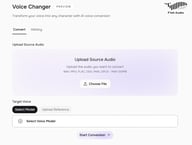
Fish Audio's Voice Changer is fully browser-based — no software to install, no plugins, no configuration. Here's the complete workflow:
Step 1: Open the Voice Changer
Go to fish.audio/app/voice-changer. You'll land on the Convert tab with an audio upload area.
Step 2: Upload Your Source Audio
Click Choose File and upload the recording you want to convert. Supported formats: WAV, MP3, FLAC, OGG, M4A, OPUS — up to 100MB per file.
This is your raw input: a voiceover take, a podcast segment, a narration draft — any single-voice audio recording.
💡 For best results: Use clean, dry audio — no background music, no reverb, no layered vocals. The AI is converting voice, not cleaning up sound design. If your source audio has background noise, consider running it through Fish Audio's Audio Separation tool first.
Step 3: Choose Your Target Voice
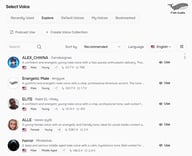
Under Target Voice, you have two options:
-
Select Model — Browse Fish Audio's library of over 2,000,000 community voice models. Filter by language, gender, style, or use case. This is the fastest route to a completely different voice.
-
Upload Reference — Have a specific voice in mind? Upload a reference audio clip of that voice (up to 10 minutes), and the AI will use it as the conversion target. This is the feature that sets Fish Audio apart from most competitors. (Ensure you own the rights to any reference audio you upload — see responsible use note below.)
Step 4: Start Conversion
Click Start Conversion. The AI processes your file and generates the converted output.
Step 5: Download Your Audio
Once the conversion is complete, download your new audio as an MP3 file — ready to drop it directly into your video editor, podcast software, or DAW.
Your conversion history is saved under the History tab, so you can revisit and re-download previous jobs without starting from scratch.
→ Open Fish Audio Voice Changer and convert your first file
⚠️ Responsible Use: When using the Upload Reference option, you must own or have explicit permission to use that voice. Never upload recordings of other people without their consent. Fish Audio's platform is built for creators working with their own voice or properly licensed audio. Misuse of voice conversion technology — including impersonation or creating deceptive content — is prohibited under Fish Audio's Terms of Service and may violate applicable laws.
How Much Does It Cost?
Fish Audio Voice Changer is available on all plans, including free.
Free accounts include a monthly credit allocation. Voice Changer is billed at 3,000 credits per minute, charged per second — so a 30-second clip costs 1,500 credits, a 60-second clip costs 3,000.
For higher-volume workflows, such as converting multiple episodes, long-form narration, or batch video dubbing — paid plans unlock significantly more credits. See Fish Audio pricing for current plan details.
4 Real Use Cases for Content Creators

1. YouTube Voiceovers: Fix a Bad Take Without Re-Recording
Every YouTuber knows the feeling: you recorded a solid take, the content is sharp, the pacing is right — but your voice that day was flat, congested, or just off. The old solution was to schedule another recording session. The new solution is a voice changer.
Run your existing audio through Fish Audio Voice Changer, select a model that matches your brand's voice, and convert. The output preserves your exact timing and delivery — every pause, every emphasis — in a cleaner, more consistent voice.
This also opens up a deliberate pre-production workflow that most creators haven't considered: record all your scratch tracks fast and loose, knowing you'll convert them later. You stop worrying about your voice and start focusing on your content. The voice changer becomes a production tool, not just a fix.
For channels with a specific persona or character voice, the voice changer lets you maintain a consistent sound across every upload regardless of recording conditions.
2. Podcast Production: Consistent Brand Voice Across Every Episode
Podcast listeners are sensitive to audio consistency. A host who sounds polished in episode 1 and tired in episode 47 creates subtle friction that erodes listener trust over time.
The voice changer solves this by letting you convert each episode's audio to a consistent target voice model — your "broadcast voice" — regardless of how you sounded on recording day. The result is a uniform listening experience across your entire back catalogue.
For narrative podcasts and audio dramas, the use case goes further: a solo creator can voice every character in a script, then convert each character's lines to a distinct voice model. Multiple cast members, zero casting budget.
3. Video Dubbing: Re-Voice Without Re-Recording
Dubbing — replacing the voice in a video with a different voice — traditionally required booking a recording studio, hiring voice talent, and spending hours on sync. AI voice changers compress that entire workflow into minutes.
Record a scratch track in your own voice, synced to the video. Then convert it to a target voice using Fish Audio Voice Changer. The timing stays locked to your original delivery, so sync is preserved automatically.
This is particularly useful for localization workflows: record once, convert to multiple character voices or regional tones. Pair with Fish Audio's Text to Speech for scripts and Audio Separation for isolating existing audio tracks, and you have a complete dubbing pipeline on one platform.
4. Privacy and Persona Building
Not every creator wants their real voice on the internet — for privacy reasons, for persona-building, or simply because the character they've created has a different voice than they do.
The voice changer supports a clean separation between the creator and the persona: you record naturally in your own voice, capturing your authentic delivery and energy, then convert to the persona voice in post. Your real voice never appears in the final content. The performance stays real; the identity stays private.
Why Fish Audio Voice Changer Is Different
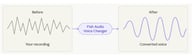
2,000,000+ Voice Models vs. Everyone Else
Here's how Fish Audio's voice model library compares to the leading alternatives:
| Fish Audio | ElevenLabs | Kits.AI | |
|---|---|---|---|
| Voice model library | 2,000,000+ | 10,000+ | Hundreds (music-focused) |
| Upload reference audio as target | ✅ | ✅ | ❌ |
| Primary use case | General content creation | General content creation | Music production |
| No download required | ✅ | ✅ | ✅ |
| Model quality benchmark | S2 Pro (public data) | Available | Not published |
Data accurate as of April 2026. Subject to change — verify current plans on each provider's website.
The scale of Fish Audio's community model library isn't a marginal difference. It's a different category. With 2 million voices spanning hundreds of languages, accents, styles, and characters, you're not choosing from a curated shortlist — you're searching for a genuine catalogue.
Upload Any Voice as Your Target
Most AI voice changers give you a fixed library and ask you to choose from it. Fish Audio's Upload Reference feature inverts that model: you bring the voice, the AI converts to it.
This means if you have a specific voice in mind — a tone that fits your brand, a character you've been developing, a style you've heard and want to match — you're not constrained to what's in any library. You set the target.
Powered by Fish Audio S2 Pro
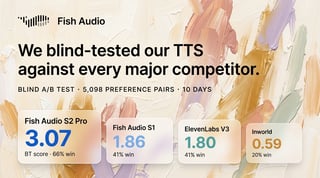
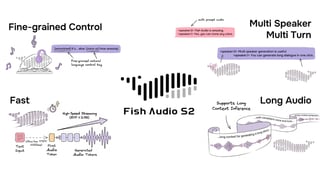
The model running under the hood is Fish Audio S2 Pro — the same model that achieves the lowest Word Error Rate on the Seed-TTS benchmark evaluation, outperforming every tested system including closed-source competitors. On the Audio Turing Test, S2 Pro scores 0.515, surpassing Seed-TTS by 24% and MiniMax-Speech by 33%.
For a technical deep-dive, the Fish Audio S2 technical report is publicly available on arXiv.
What this means in practice: your converted audio sounds natural. The transformation preserves emotional nuance — the difference between a sentence delivered with urgency and the same sentence delivered with calm — in a way that lower-quality models flatten out entirely.
Part of a Complete Audio Workflow
Voice Changer doesn't exist in isolation. Fish Audio's full platform includes:
-
Voice Cloning — Build a reusable voice model from a short sample
-
Text to Speech — Generate speech from any script in any voice
-
Story Studio — Multi-voice narrative audio production
-
Audio Separation — Isolate vocals from any audio file
-
Speech to Text — Transcribe audio with high accuracy
Every tool in the suite feeds into the others. A typical production workflow might run: Audio Separation (isolate the vocal) → Voice Changer (convert the voice) → download and sync. No platform-switching, no file format juggling.
What's Coming Next
Fish Audio Voice Changer is already live — but it's expanding. API access for Voice Changer is in development, which will let developers and production teams integrate voice conversion directly into their own tools, pipelines, and applications.
If you're building something that could use programmatic voice conversion — automated dubbing pipelines, content localization tools, voice-driven applications — keep an eye on Fish Audio's Weekly Update for information.

Sabrina is part of Fish Audio's support and marketing team, helping users get the most out of AI voice products while turning launches, updates, and customer insights into clear, practical content.
Lire plus de Sabrina Shu